In addition to the NatureServe Categorical Species Habitat Models and NatureServe Continuous Species Habitat Models image services, the Species Habitat Model data (raster + metadata pdf) is packaged for download by individual species. Downloading the data allows you to use the model locally.
- Sign up for the Geodata Portal, if you have not already done so.
- Navigate to the NatureServe Geodata Portal and sign in using your Explorer Pro credentials.
- Once your account has access to the occurrence data and Habitat Models, you can navigate to the Group Content on the NatureServe Geodata Portal to see all the content.
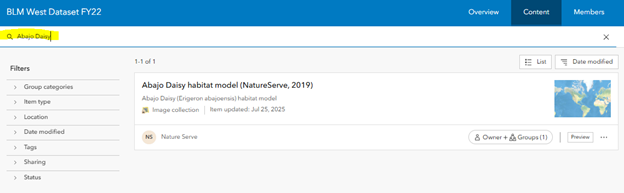
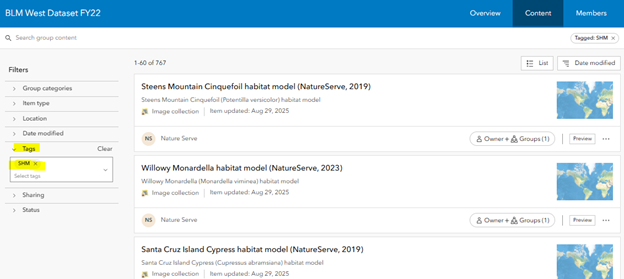
- Locate the Species Habitat Models you want to download by searching for an individual species by name (first figure below) or searching for all available species by the "SHM" tag (second figure below).
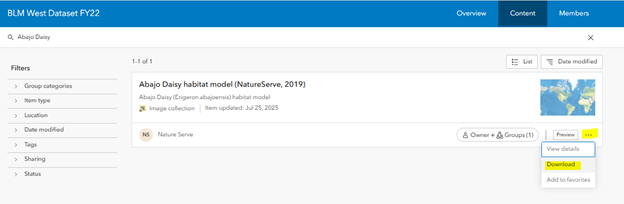
- Click on the "..." for the item and click "Download".
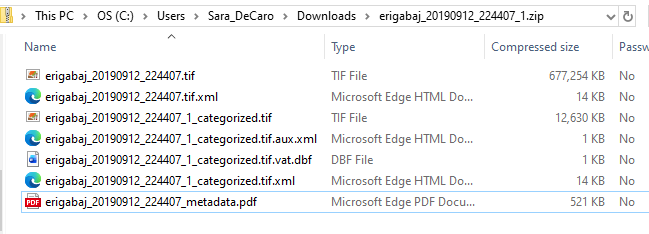
- Open up to your downloads folder and unzip the contents. Here you will see the TIFF file and metadata pdf.